
Build Cold Email Campaigns That Keep Moving.
Create your sequence, add your leads, choose your sending accounts, set your schedule, and let MunchReach manage the sending and follow-ups.
- Sequences
- AI personalization
- Smart scheduling
- Multi-mailbox sending
Everything Starts in One Campaign Builder
Build the entire outreach workflow before you send a single email.
Created 12 Sep · Workspace: Acme Growth
- 1Campaign setup — name, workspace and status in one header.
- 2Lead list attached to the campaign, deduplicated and suppression-checked.
- 3Email sequence with the initial email and every follow-up step.
- 4Sending accounts assigned to this campaign.
- 5Schedule: sending window, timezone and sending days.
- 6Daily limit, live campaign status and tracking options.
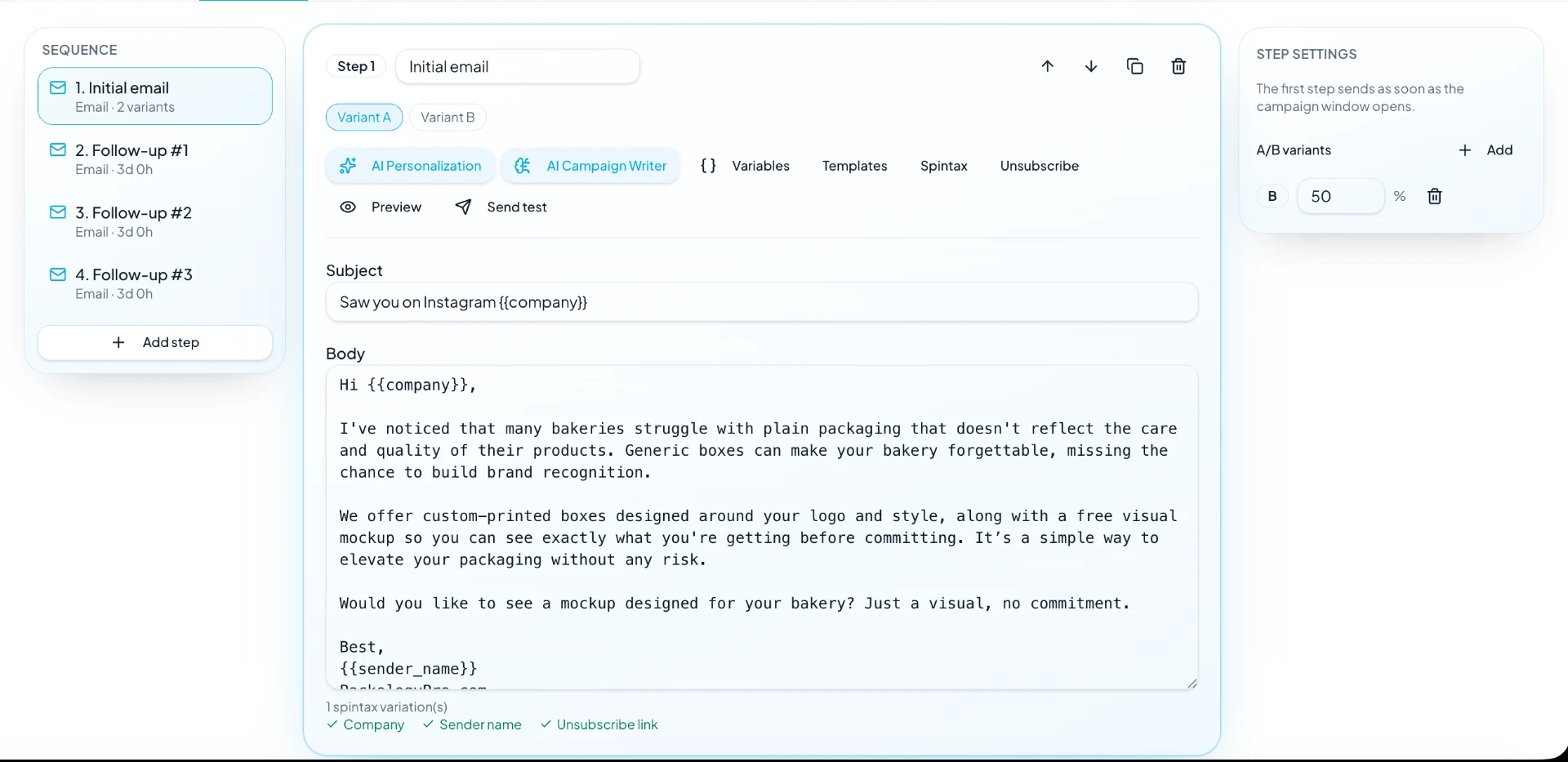
Build the Conversation, Not Just the First Email
Write once, then let MunchReach deliver each step according to your campaign rules.
{{first_name}}, quick question about {{company}}
Re: {{company}} — one more thought
Worth a 15-min look?
Closing the loop, {{first_name}}
Hi {{first_name}},
{{ai_personalization}}
We help teams like {{company}} run outbound without babysitting mailboxes. Worth a short look next week?
— Sam
Make Every Email Feel Personal
Generate a personalized line for each lead using the information available in your lead record.
Use Your Sending Accounts Without Managing Them One by One
MunchReach distributes campaign sending across the sending accounts available to the campaign while respecting each mailbox's sending capacity and safety state.
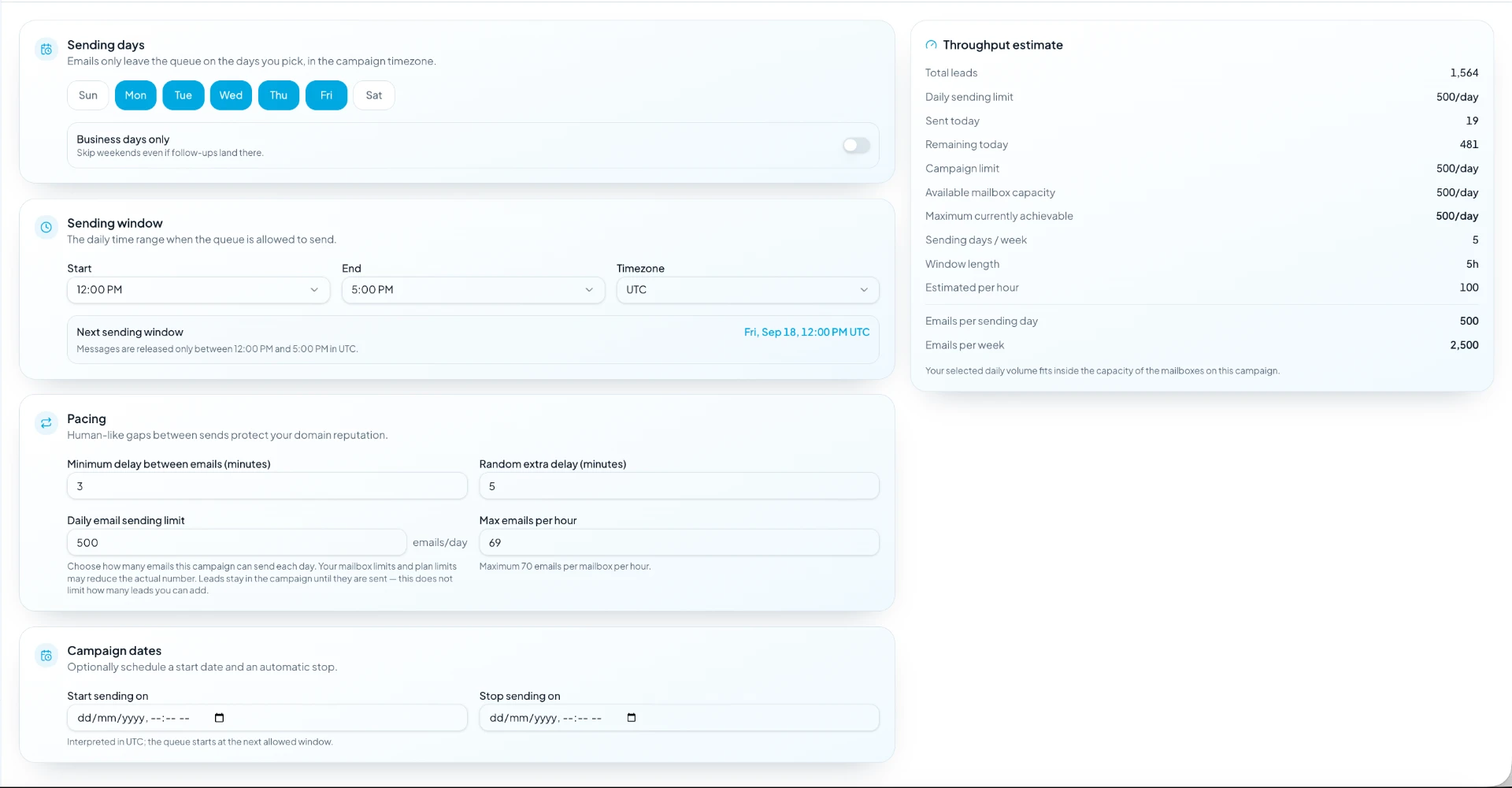
Set the Schedule. MunchReach Handles the Queue.
If the campaign reaches its daily sending capacity, the remaining messages stay queued for the next eligible sending window — the campaign does not become completed just because today's quota is full.
Your Campaign Doesn't Stop After One Day
What the same campaign does across its first three sending days.
- Campaign starts at 6:00 PM
- Sends until the daily capacity is reached
- Remaining leads stay queued
- Campaign resumes automatically at 6:00 PM
- The remaining queue continues where it stopped
- Eligible failed messages are retried
- Campaign continues in the same window
- Follow-up steps enter the queue
- More new leads are processed
When Something Fails, Don't Lose the Lead
Every send outcome is routed to the behavior that fits it.
Provider timeouts, rate limits and capacity errors stay eligible and are retried on the next run.
A rejection that will not change is marked failed instead of retried again and again.
A permanently undeliverable address is suppressed so no further step is sent to it.
The lead moves on to the next step at its configured delay, unless they reply first.
See What Your Campaign Is Actually Producing
Today's run and lifetime campaign results are reported separately. Mailbox warmup activity is never mixed into campaign analytics.
Replies Become Real Conversations
When prospects reply, the conversation can be managed from the Unified Inbox instead of forcing users to search through multiple mailboxes.
Interesting — how does the pricing work?
Can you send a time for Thursday?
Out of office until the 14th.
Not right now, thanks.
Hi Sarah, noticed your team recently expanded into procurement tooling…
Interesting — how does the pricing work?
From Campaign Setup to Conversation
Add Leads
Import a list or pull existing leads into the campaign.
Build Your Sequence
Write the first email and chain the follow-ups.
Choose Sending Accounts
Assign the mailboxes this campaign may send from.
Set Schedule & Limits
Pick the window, timezone, days and daily limit.
Launch Campaign
The campaign starts on the next eligible window.
Why MunchReach Campaigns
Build Once
Create the sequence, personalization, schedule and sending rules in one campaign.
Keep Sending
Your campaign continues across eligible sending windows instead of stopping when one day's quota is reached.
Know the Result
Track sends, replies, reply rate, bounces, positive replies and meetings.
Who It's For
Sales Teams
Structured outbound across shared lead lists and several reps.
Run campaigns without manually managing every sending step.
Agencies
Separate campaigns, mailboxes and reporting per client.
Manage multiple campaigns and sending accounts across client workspaces.
Founders & Small Teams
Selling early with no dedicated outbound operator.
Build and run outbound without a complicated sending setup.
Start a Campaign in Four Steps
- 1
Add your leads
Import a CSV or select leads already in your workspace.
- 2
Write your sequence
One initial email plus the follow-ups and their delays.
- 3
Configure sending
Choose mailboxes, the sending window and the daily limit.
- 4
Launch
MunchReach runs the queue and schedules the follow-ups.
Frequently Asked Questions
Everything you need to know about MunchReach.
Build Your First Campaign.
Create your sequence, choose your sending setup, and let MunchReach handle the daily execution.