
Everything You Need to Turn Cold Emails Into Conversations
Find the right prospects, build targeted campaigns, automate follow-ups, manage replies, and track your outreach from one powerful workspace.
Campaigns • Leads • Follow-ups • Unified Inbox • Warmup • Automations • Analytics
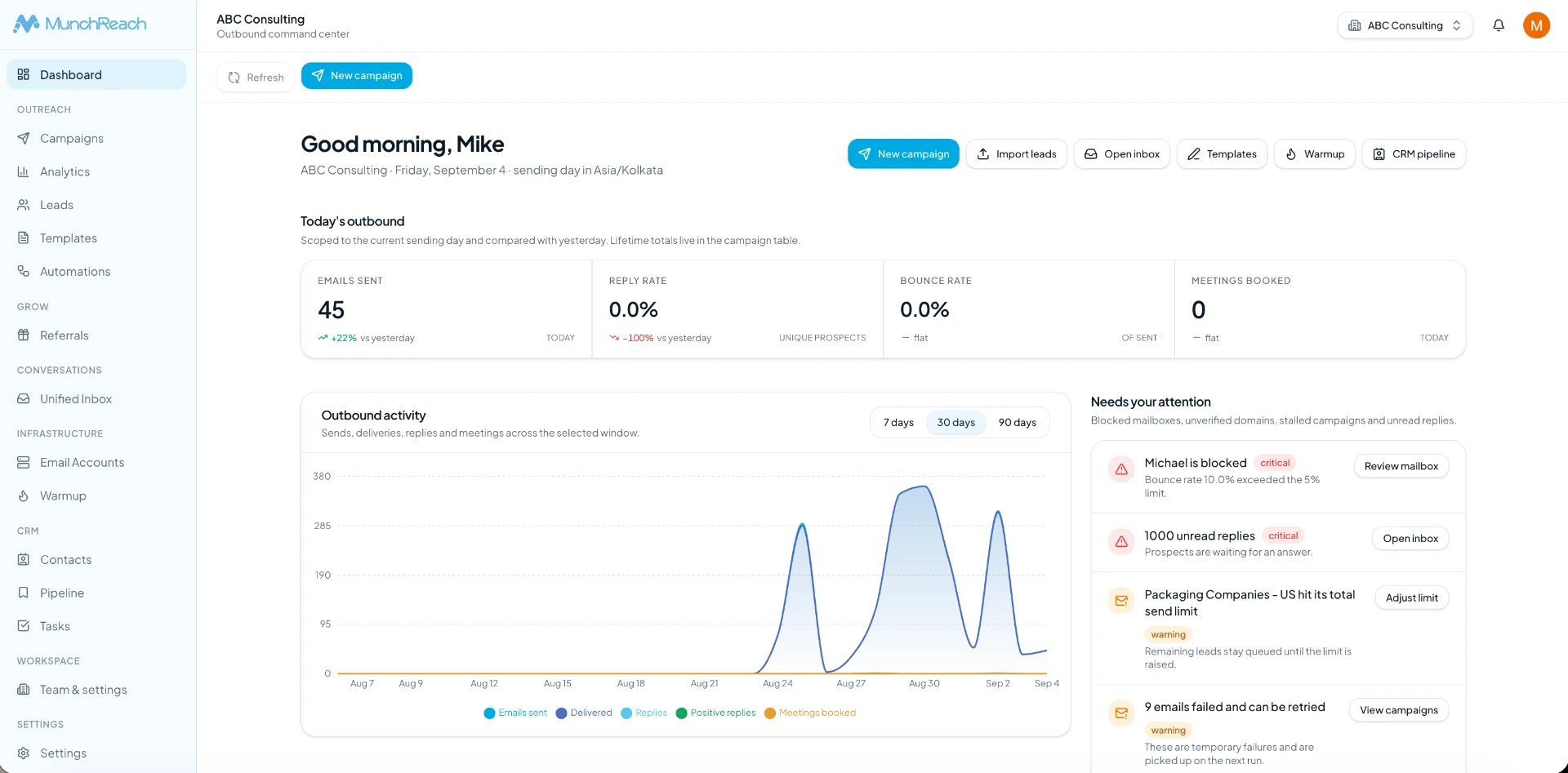
One workspace for your entire outbound workflow.
You don't need a sending tool, a spreadsheet, a separate inbox and a CRM. MunchReach runs the full loop in one place, so every step hands off to the next automatically.
Find prospects
Decide who you want to reach and collect them into a list.
Import leads
Upload a CSV, map your fields and organize leads into lists.
Build campaign
Create a multi-step sequence with wait windows and schedules.
Personalize
Use lead variables and AI-assisted opening lines in your copy.
Automate follow-ups
The sequence keeps going until the prospect replies.
Receive replies
Inbound replies are captured and matched to the lead.
Manage conversations
Read, assign and answer everything in the unified inbox.
Track results
Delivery, opens, clicks, replies and bounces per campaign.
Sounds interesting — can you…
Who handles this on your side?
Not right now, thanks.
Build campaigns that keep moving.
Create targeted outbound campaigns, define your sequence, personalize messages, and automate follow-ups without manually managing every step.
- Multi-step sequences
- Personalized email content
- Automated follow-ups
- Scheduling
- Campaign controls
- Campaign analytics
- Lead-level campaign activity
Keep every prospect organized.
Leads live in the same workspace as your campaigns. Import them, group them into lists, act on them in bulk, and follow each prospect's history from first send to reply.
- Import leads
- Lead lists
- Bulk actions
- Lead status
- Lead activity
- Campaign assignment
- Workspace-based organization
- Prospect history
Follow up without thinking about it.
Most replies come from the follow-up, not the first email. When a prospect doesn't respond, the sequence continues on its own schedule — and stops the moment they answer.
- Multiple follow-up steps
- Delayed follow-ups
- Scheduling controls
- Automatic sequence progression
- Stop/exit conditions
- Reply-aware workflow
Your follow-ups keep working even when you're not.
- Intro emailSent · Day 0
- Wait 3 daysNo reply detected
- Follow-up #1Scheduled · Tue 09:15
- Reply receivedSequence stops automatically
Every reply in one conversation.
Stop jumping between inboxes and campaigns. MunchReach brings prospect replies into a central conversation view so teams can claim, reply, organize and manage conversations.
- Unified conversations
- Reply tracking
- Lead matching
- Conversation history
- Team assignment
- Interested lead tracking
- Realtime updates
Sounds interesting — can you…
Who handles this on your side?
Not right now, thanks.
Connect your sending accounts in minutes.
Connect and manage the mailboxes you use for outbound campaigns, keep an eye on their status, and choose which accounts each campaign sends from.
- Multiple sending accounts
- Account health
- Sending status
- Provider configuration
- Campaign assignment
- Sending controls
Protect your sending reputation.
Warmup builds up gentle, natural activity on a mailbox before and alongside your campaigns, so a new sending account isn't pushed to full volume on day one.
- Automated warmup
- Mailbox health
- Sending activity
- Warmup tracking
- Separate campaign and warmup metrics
- Account-level monitoring
Warmup runs on its own track — it never counts toward your campaign numbers.
Use AI where it actually saves time.
Drop {{ai_personalization}} into a campaign step and MunchReach writes the opening line for each lead from the fields you imported — company, role, industry and lead notes. You connect your own API key and stay in control of the output.
- AI-assisted personalization
- AI suggestions from your own lead data
- Automated personalization workflows
- Personalization controls and preview
Generated from the lead fields you imported — company, role, industry and lead notes. Every line stays editable before the campaign sends.
Turn repetitive work into workflows.
Build workflows from real product events: a lead replies, a positive reply is detected, an email bounces, a CRM stage changes. Add conditions, then let the workflow do the follow-through.
- Triggers: lead added, lead replied, positive reply, bounce, unsubscribe
- Conditions on lead, campaign, CRM and activity fields
- Actions: stop follow-ups, add or remove from campaign
- Actions: move CRM stage, tag, create task, assign owner
- Wait steps in minutes, hours, days or business hours
- Internal, Slack and outbound webhook notifications
Know what your outreach is actually doing.
See campaign activity and understand which campaigns, sequences and leads are generating engagement. Every number comes from tracked events on your own sending — nothing is simulated.
- Sends and deliveries
- Opens and clicks
- Replies and interested leads
- Bounces and unsubscribes
- Per-campaign breakdown
- Lead-level activity
Keep prospect relationships organized.
Outreach creates relationships, and the built-in CRM keeps them. Contacts, pipeline stages, tasks and history sit next to the campaigns and conversations that produced them.
- Contacts
- Pipeline
- Tasks
- Lead status
- Conversation history
- Prospect organization
Start faster with reusable templates.
Save the emails that work and reuse them across campaigns. Templates support the same lead variables as campaign steps, so a reusable email still reads like it was written for one person.
- Save reusable email templates
- Lead variables inside templates
- Reuse across campaigns and steps
- Edit before sending
Connect MunchReach to the tools you already use.
These are the integrations available in the product today. Each one is configured from Settings → Integrations in your workspace.
OpenAI
AIBring your own API key for AI personalization.
Slack
NotificationsSend workflow notifications to a channel.
Zapier
AutomationTrigger and receive events from your Zaps.
Make
AutomationConnect scenarios to outbound events.
HubSpot
CRMKeep prospect records in sync with your CRM.
GoHighLevel
CRMPush outreach activity to your GHL account.
Calendly
CalendarBooking and cancellation events drive workflows.
Google Sheets
DataMove lead and activity data in and out.
Separate clients, teams and campaigns cleanly.
Workspaces keep campaigns, leads, mailboxes and team access organized. Invite teammates with the role they need and switch between clients without mixing data.
- Owner, Admin and Member roles
- Team invitations
- Per-workspace campaigns and leads
- Per-workspace mailboxes
- Scoped conversations and CRM
- Switch workspaces instantly
Campaigns, leads, mailboxes and conversations are scoped to the workspace they belong to.
Build MunchReach into your workflow.
The developer portal documents authentication, the available public endpoints, request and response shapes, webhook events, error codes and rate limits — with copyable examples.
- API documentation portal
- Authentication and signing
- Integration event endpoints
- Automation webhook endpoints
- Inbound email endpoint
- Request, response and error examples
curl -X POST https://munchreach.com/api/public/automations/{token} \
  -H "Content-Type: application/json" \
  -d '{"email":"lead@company.com"}'
Everything you need for outbound — in one place.
Each area below is part of the same product and shares the same leads, campaigns and history.
Lead Management
Import, lists, bulk actions, status.
Campaigns
Multi-step sequences and schedules.
Personalization
Lead variables and AI opening lines.
Follow-ups
Automatic progression, reply-aware.
Inbox
Central replies with assignment.
Warmup
Separate ramp and health tracking.
Automations
Triggers, conditions and actions.
Analytics
Real delivery and engagement events.
CRM
Contacts, pipeline, tasks, history.
API
Public endpoints and webhooks.
From first prospect to closed conversation.
One record moves through the whole system — no re-entering data, no exports between tools.
Lead
Imported into a list inside your workspace.
Campaign
Enrolled as a recipient in a multi-step sequence.
Personalization
Variables and AI lines rendered per lead.
Sent from your connected mailbox on schedule.
Follow-up
Next step runs automatically without a reply.
Reply
Inbound response captured and matched.
Unified Inbox
Conversation assigned, answered and tracked.
CRM
Contact moves along the pipeline with tasks.
Analytics
Every event rolls up into campaign reporting.
- Intro emailSent · Day 0
- Wait 3 daysNo reply detected
- Follow-up #1Scheduled · Tue 09:15
- Reply receivedSequence stops automatically
Built for teams that sell through outbound.
However you go to market, the workflow is the same: build a list, run a sequence, handle the replies.
Agencies
Run separate workspaces per client with their own mailboxes, leads and campaigns.
Client work stays cleanly separated
Sales teams
Share a unified inbox, assign conversations and track pipeline stages together.
No reply falls through the cracks
Founders
Run your own outbound without hiring a team or stitching four tools together.
Outbound you can run yourself
Consultants
Send small, highly personalized sequences using AI opening lines and lead notes.
Personal at a workable volume
Recruiters
Reach candidates with sequences and keep every conversation on the contact record.
Full candidate history in one place
B2B service businesses
Automate follow-ups and let workflows create tasks when someone shows interest.
Interest turns into next steps
MunchReach features — frequently asked questions
What the product does today, in plain language.
Everything you need to build better outbound campaigns.
Build targeted campaigns, automate your follow-ups, manage every conversation, and keep your entire outbound workflow in one place.