
Turn Your Agency's Expertise Into a Repeatable Outreach Engine
Build targeted campaigns, manage prospects, follow up consistently, and keep client acquisition organized from one platform.
- One acquisition playbook, reused
- Client and own-pipeline campaigns
- Reporting straight from the product
Still rebuilding the same acquisition workflow for every client?
Marketing agencies know how to build campaigns. The bottleneck is the operational layer underneath them, rebuilt from scratch each time a new logo signs.
Client campaigns
Every engagement starts with the same setup work, and none of it carries over to the next one.
Lead organization
Audience lists arrive from research, exports and scrapes in different shapes, and cleaning them is manual.
Sending accounts
Each client brings mailboxes and domains that need limits, warmup and monitoring.
Follow-ups
The multi-touch plan in the proposal does not survive contact with a busy delivery week.
Reporting
Clients expect clear numbers, and building them by hand each month eats profit on the retainer.
Campaign management
Knowing what is live for whom requires asking three people and opening five tabs.
One platform behind every client engagement
Leads, campaigns, sequences, sending accounts, scheduling, warmup, the unified inbox, replies, analytics, CRM and automations run in one workspace per client, so your playbook becomes a product you deliver rather than a process you rebuild.
Workspace per client
Complete separation of lists, campaigns, mailboxes, conversations and reporting.
Playbook reuse
Save the sequence, schedule and segment structure that works and deploy it again.
Sending managed centrally
Every mailbox you run for every client, with limits and health in one screen.
Conversations in one place
Replies for each client grouped, assignable and easy to hand over.
Reporting built in
Campaign numbers that come from the campaign, ready to put in front of a client.
From prospect to conversation
Seven steps, in the order you would actually do them. Each one happens in the same workspace, so nothing has to be exported, re-imported or reconciled between tools.
Build your prospect list
Start from the people worth talking to. Import a CSV, map your own columns and let duplicates and previously suppressed addresses drop out on the way in. The list becomes a reusable source rather than a one-off file.
Organize your leads
Segment the list by the fields that change your message — role, industry, region, company size. Clean segments are what make personalization possible later, and they let you compare performance between audiences afterwards.
Create your sequence
Write the opening email and the follow-ups that come after it. Personalization variables pull from your imported fields, and fallbacks keep the sentence intact when a value is missing. Every step has its own delay.
- Intro emailSent · Day 0
- Wait 3 daysNo reply detected
- Follow-up #1Scheduled · Tue 09:15
- Reply receivedSequence stops automatically
Connect your sending accounts
Add the mailboxes the campaign will send from and set a daily limit for each. Warmup runs in the background, and health status tells you when an account should carry less volume for a while.
Schedule your campaign
Choose the time zone, the sending window, the daily cap, the hourly maximum and the delay between messages. The scheduler spreads the day's volume across your accounts instead of firing everything at once.
Manage replies
Answers arrive in the unified inbox with the full thread and the prospect record attached. Remaining follow-ups stop automatically for anyone who replies, bounces or unsubscribes, so nobody gets chased after answering.
Sounds interesting — can you…
Who handles this on your side?
Not right now, thanks.
Measure performance
Track sends, deliveries, replies, positive replies and unsubscribes per campaign, per segment and per sending account — so the next campaign is built on what happened in the last one.
Turn your expertise into a repeatable acquisition process
What agency teams need to make client acquisition a delivery motion rather than a one-off build.
Client campaigns
Campaigns scoped to a client workspace with their own audience, sequence and schedule.
Targeted lead lists
Import and segment audience data per client, with duplicate and suppression filtering.
Sending account management
Connect client mailboxes, set daily limits and keep warmup running in the background.
Sequences
Multi-step sequences with personalization drawn from the client's own audience data.
Unified inbox
One place for the team to work replies and pass conversations to the client.
Analytics
Delivery, reply and positive-reply performance per campaign and per mailbox.
One workspace for your entire outbound operation
Campaigns, leads, sending accounts, the inbox, analytics, CRM and warmup are parts of the same product — not integrations you have to keep in sync.
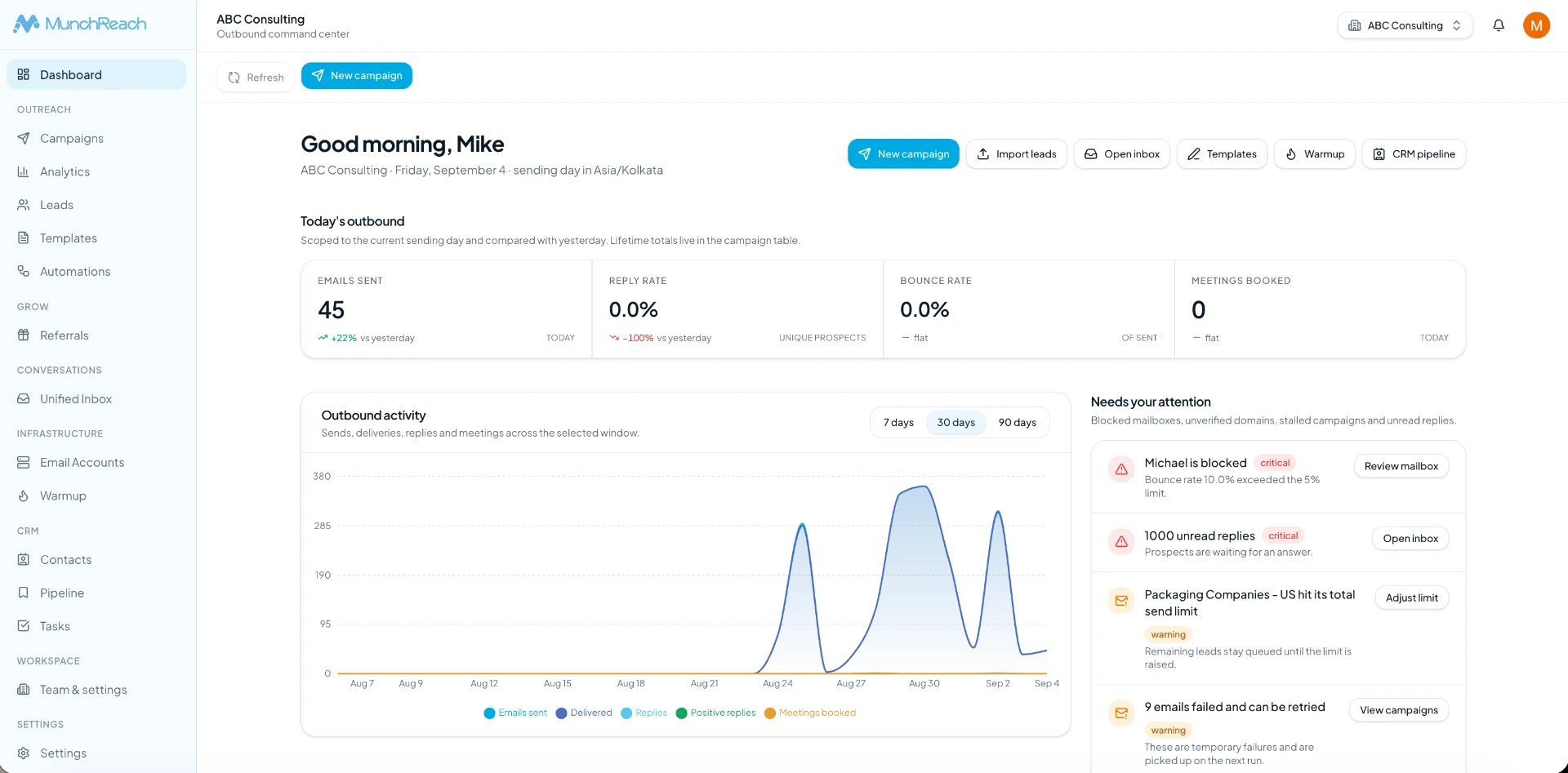
Campaigns
Every campaign with its audience, sequence, schedule and current state.
Leads
Imported, deduplicated and segmented contact data feeding those campaigns.
Sending accounts
Connected mailboxes with daily limits, health and capacity in view.
Inbox
Replies from every campaign and mailbox in one shared thread list.
Analytics
Delivery, reply and positive-reply performance you can act on.
CRM
Statuses, owners and notes carrying conversations to an outcome.
Warmup
Sending reputation built and maintained in the background.
See the product behind the workflow
Real MunchReach interfaces, in the order an outbound team touches them.
Set the campaign up once, then let it run
A campaign holds everything that decides what goes out and when: the audience, the sequence, the sending accounts and the schedule. Change one of them and the plan for the coming days is rebuilt around it.
- Multi-step sequences with per-step delays
- Time zone, sending window and daily cap per campaign
- Hourly maximum and randomized delay between sends
- Follow-ups cancelled on reply, bounce or unsubscribe
Keep sending capacity visible and under control
Volume is limited by the mailboxes behind it. Every connected account shows its daily limit, how much of it is used and whether it is healthy enough to keep sending today.
- Per-account daily limits and hourly caps
- Health status before capacity becomes a problem
- Volume spread across accounts automatically
- Warmup running in the background
Every reply in one thread list
Replies from every campaign and every mailbox land in one place, with the exact message that was sent, the full thread, the prospect record and any notes your team added.
- The sent email exactly as the prospect received it
- Assign conversations and leave internal notes
- Reply without switching mailboxes
- Status updates that flow through to the CRM
Sounds interesting — can you…
Who handles this on your side?
Not right now, thanks.
Numbers that tell you what to change
Delivery, reply and positive-reply performance per campaign, segment and sending account — the three levels where outbound is usually fixed.
- Sends, deliveries, replies and unsubscribes over time
- Positive replies tracked separately from raw replies
- Performance compared between campaigns
- Mailbox-level view when delivery drops
Sending reputation maintained quietly
New mailboxes ramp gradually and established ones keep a steady background pattern, so a campaign is not the first serious traffic an account has ever sent.
- Gradual ramp for new accounts
- Ongoing activity for established mailboxes
- Visible per-account warmup status
- Nothing to configure per campaign
How a marketing agency runs MunchReach
The same delivery motion for every client you take on.
- 1
Client
Create the workspace and agree the offer.
- 2
Target market
Define the audience worth contacting.
- 3
Leads
Import and clean the audience data.
- 4
Campaign
Deploy your proven sequence and schedule.
- 5
Sending accounts
Connect and warm the client's mailboxes.
- 6
Replies
Work conversations and hand over the good ones.
What changes once outbound lives in one place
No promises about reply rates or meetings — those depend on your offer and your list. What MunchReach changes is the operation around them.
- Repeatable acquisition workflows
- Your playbook is deployed rather than rebuilt for each engagement.
- Less campaign administration
- Setup, scheduling and monitoring live in one system.
- Centralized client outreach
- Every client's campaigns, mailboxes and replies in their own workspace.
- Better campaign visibility
- What is live, what is sending and what is replying, without a status meeting.
Without MunchReach
- A new setup for every client
- Audience data cleaned by hand
- Follow-up plans that slip
- Reports assembled manually
With MunchReach
- A deployable acquisition playbook
- Import, map and dedupe in one pass
- Scheduled follow-ups that stop on reply
- Client reporting from live data
Why MunchReach?
One platform
Manage the moving parts of outbound from one workspace instead of stitching tools together.
Unified inbox
Prospect conversations stay together, with the exact message that was sent attached to the thread.
Multiple sending accounts
Sending infrastructure is managed centrally, with limits, health and warmup per account.
Campaign control
Schedules, sequences, sending windows and daily limits are yours to set per campaign.
Analytics
Delivery, reply and positive-reply performance at campaign, segment and mailbox level.
Built for outbound
The product is designed around the operational workflow of outbound teams, not adapted from a generic mail tool.
Frequently Asked Questions
Everything you need to know about MunchReach.
Ready to build a repeatable client acquisition engine?
Set up your first client workspace and deploy your playbook instead of rebuilding it.